Create the desired image with Nano Banana

Create the image you want with Nano Banana | Sugiyama Nobutsugu

5 principles for producing the desired image with Nano Banana

What you need to get close to your ideal image with Nano Banana、It's not a difficult spell。

What's important is、
the visual in my head、is to convert the model into a structure that can be interpreted。

Points that beginners should keep in mind first、The following five。

  • write specifically
  • Organize information with structure
  • Write in complete form rather than in negation
  • Specify camera/composition
  • Don't decide in one go, do it step by step.

By holding these five things、Output repeatability and accuracy are greatly improved。


Prerequisites to understand first

Prompts are not “words” but “direction instructions”

What beginners tend to do、A list of keywords。

NG例

  • beautiful woman
  • cafe
  • Fashionable
  • natural light
  • Photoreal

This is an "element memo"、
画面設計の指示になっていません


OK mindset

👉 プロンプトは「撮影現場でのディレクション」


改善例(具体化)

30代前半の女性が午前中の落ち着いたカフェでノートパソコンを操作している
ベージュのニットとダークブラウンのロングスカート
窓際の席、Soft natural light from the right side。
coffee cup and notebook on the table。
Bust up composition、Slightly diagonal 45 degree perspective。
Photorealistic、Texture like a lifestyle feature in a magazine。


1. write specifically

Increase the granularity of information

By clarifying “who, where, what, and how to show”、Prevents blurred interpretations。


NG例

businessman photo


OK example

40A male businessman in his teens、Walking in the office in the evening while looking at my smartphone。
dark gray suit、white shirt、navy tie。
The background is a glass hallway、The cityscape at sunset outside。
Horizontal composition that fits the whole body、The camera seems to follow at eye level。
やや浅い被写界深度で背景は軽くボケる
シネマティックで落ち着いたトーン

generated image

2. Organize information with structure

"Order of elements" improves accuracy

同じ内容でも順番がバラバラだと解釈が不安定になります


Recommended structure (basic template)

  • 画風
  • subject
  • 動作
  • 場所・時間
  • 構図・カメラ
  • Light
  • finishing

👉 この順番にするだけで「読みやすい指示」になります


Example (structured prompt)

photorealistic images。
30代前半の女性が午前中の落ち着いたカフェでノートパソコンを操作している
ベージュのニットとダークブラウンのロングスカート
窓際の席、Soft natural light from the right side。
coffee cup and notebook on the table。
Bust up composition、Slightly diagonal 45 degree perspective。
Texture like a lifestyle feature in a magazine。

generated image

3. Write in “completed form” rather than negation

It is easier to understand the model as a "completed image" than as "exclusion conditions"。


NG例

make sure there are no people、Lost the signboard、Don't make a mess


OK example

A quiet shopping street with no traffic。
A row of simple buildings、Signage is minimal。
linear and orderly composition。
Clear morning air and uniform natural light。


*Exceptions only when editing (deletion, replacement, etc.)


4. Specify camera/composition

If the composition is vague、A normal, nondescript imagebecomes。


NG例

woman walking in the city


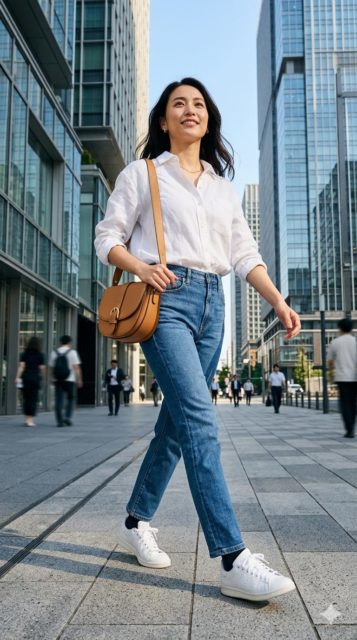
OK example

20A woman in her late teens is walking on a city sidewalk。
white shirt and denim、shoulder bag。
The camera is a low angle from a low position。
Vertical composition that includes the whole body (9:16)。
In the background are glass buildings。
Contrast is a little strong in front light。
Clear and sharp depictions like fashion advertisements。

generated image

5. Don't decide in one go (staged design)

Image generation is a "design process"。


Practical flow

1times (base)

A woman working at a cafe during the day。Photoreal。

generated image

2回目(人物調整)

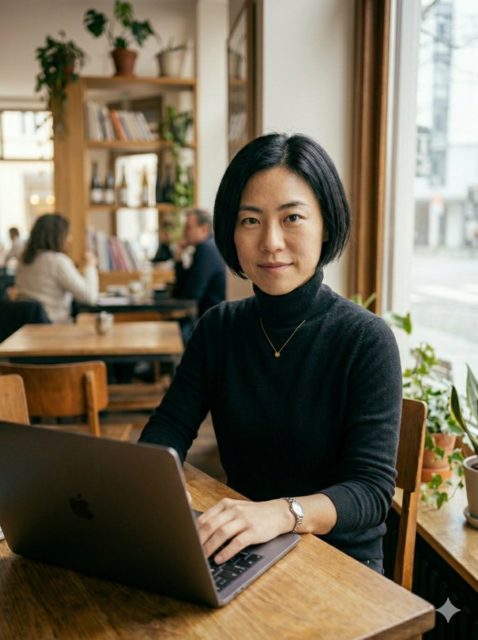
20代後半日本人女性。short bob。黒のタートルネック

generated image

3回目(環境調整)

木製テーブルと観葉植物。looking at camera。

generated image

4回目(構図調整)

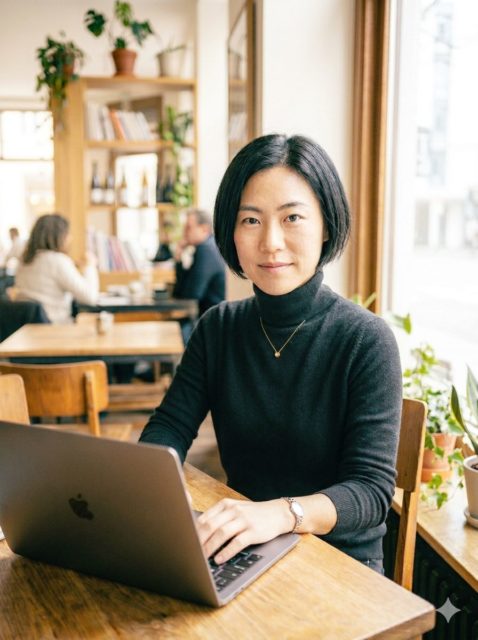
bust up、縦構図目線より少し上から

generated image

5回目(仕上げ)

全体的に明るくハイキーで爽やかな感じに

generated image

Important points

👉 修正時は「維持」と「変更」を明確にする


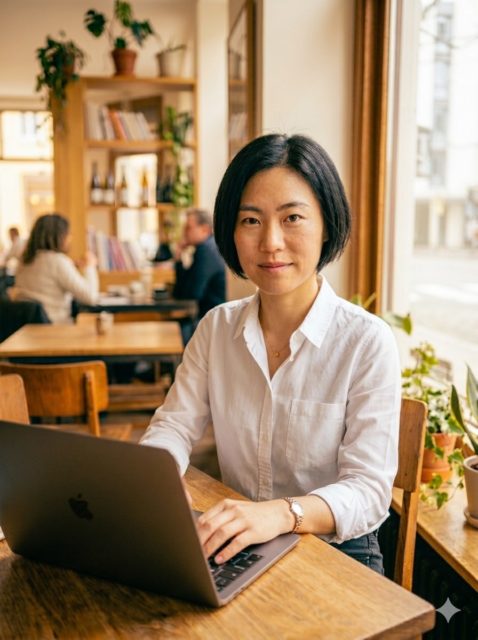
Case

Maintain your facial features and hairstyle、Change your clothes to a white shirt。
The composition remains the same、Change the light to warm evening colors。

generated image

summary

How to get stable results with Nano Banana、
Write with structure rather than feelingis important。

Five principles again:

  • write specifically
  • Organize by structure
  • write in complete form
  • Specify the composition
  • fill in stages

By holding these five things、
From mere “generation”、intentional visual designchanges to。

▶︎ [Create gravure-style photos with AI portrait]

▶︎ [How to make AI photos | How to make realistic photos with image generation AI]

▶︎ [How to write an AI photo prompt | Tips for creating realistic photos]

▶︎ [Practical theory of prompt design in portrait generation AI]

▶︎ [Portrait generation AI prompt design starting in Japanese]